Season Of KDE 2026 Conclusion
Introduction
Another year, another successful Season Of KDE for 20 contributors! This article has been co-written with the input from all contributors.
Lokalize
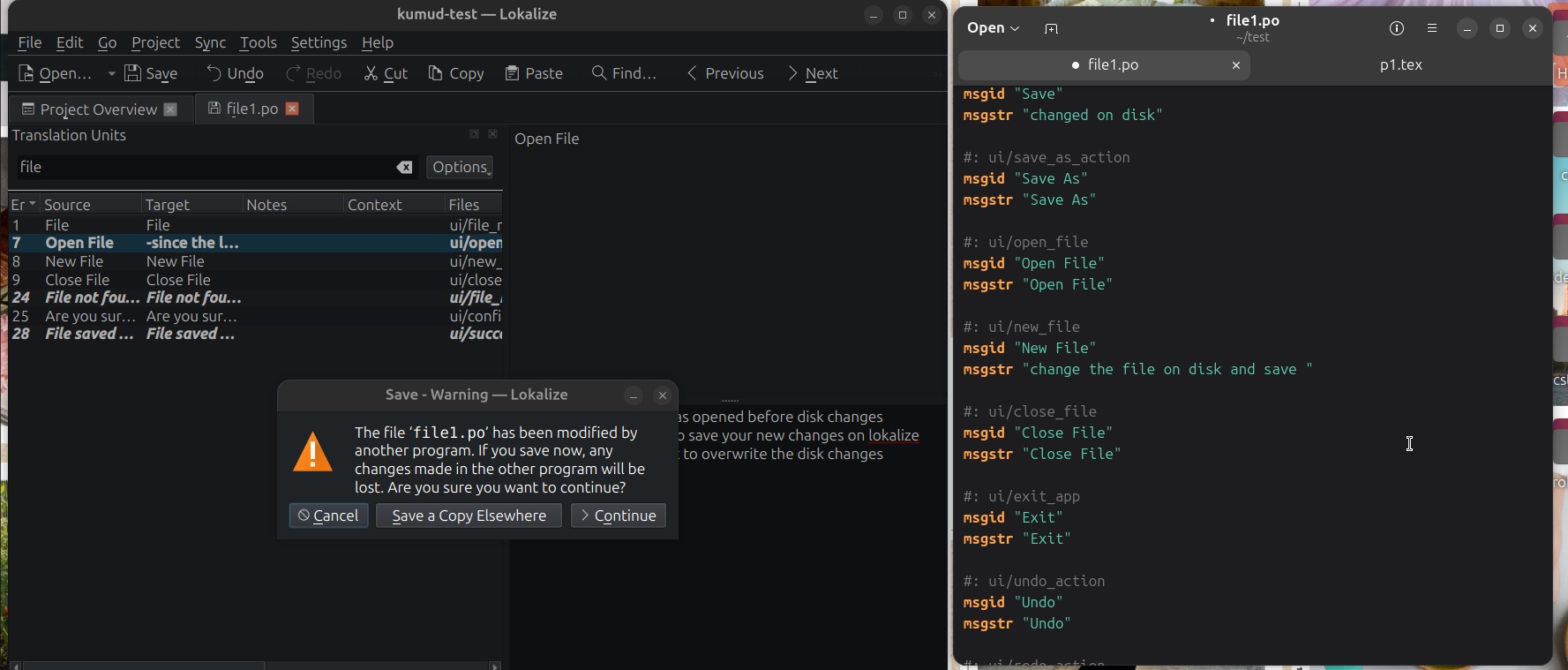
During Season of KDE 2026, Tanish Kumar worked on cleaning up the UI in Lokalize, KDE’s translation tool. The main task was fixing an annoying bug where the menu bar kept jumping around whenever you switched tabs, which was solved by giving the menus a stable “skeleton” in the KXMLGUI .rc files. Along the way, a bunch of “ghost actions” were discovered - menu entries that existed only in XML - and actually implemented the missing ones like Cut, Copy, Paste, Alternate Translation, Save All, Revert All, and Close All. He also built a Bookmark Manager dialog so translators can see all their bookmarks in one place.

Navya Sai Sadu and Kumud Sagar fixed navigation inconsistencies in the Editor Tab where shortcuts like “Approve and Go Next” failed to respect active filters and custom ordering in the Translation Units view. They ensured consistent behavior across all related shortcuts, including Next Ready, Next Non-Empty, and Next Bookmark. They unified the traversal logic so navigation always follows the filtered and ordered entries and users of Lokalize can now navigate through Translation Units using the keyboard shortcuts or the options in Go menu properly..

Additionally, Kumud identified Lokalize’s on-disk file tracking mechanism and began improving its handling of external file updates.
Jaimukund Bhan fixed foundational issues with the Glossary file, ensuring it could be properly loaded, saved, and autosaved, and cleaned up the codebase by removing an obsolete Restore function that no longer made sense once autosaving was in place. Several UI bugs were resolved, including the editor failing to clear when all terms were deleted and incorrect pre-selection behavior when the app started on the Glossary tab. In the second half, Jaimukund improved the manual term addition workflow by replacing silent blank entry creation with a proper dialog prompt, preventing accidental accumulation of empty entries. He also fixed a broken keyboard shortcut for switching to the previously active tab by replacing an index-based tracking variable with a widget pointer, which remains valid even as tab positions change.

Aditya Sarna made a full Figma redesign for the Glossary tab, which was referenced in several places to implement comprehensive UI and UX improvements. The work involved close collaboration with translators to understand user pain points and iterating on designs based on feedback from the design group. It included replacing button text with icons and adding tooltips to the Add and Delete buttons to clarify their purpose. This was followed by designing a new delete functionality, which introduced a cross button for each entry to make deletion more intuitive. Several additional UI changes were implemented, including shifting elements and improving the overall structure and layout of the Glossary tab. Furthermore, the workflow for adding new terms was refined by moving note text into the dialogue box and enhancing its layout, resulting in a cleaner, more intuitive and user-friendly interface.

Varun Sajith Dass worked on improving the proofing capabilities of Lokalize and implemented a reactive character consistency check that alerts translators in real-time when special characters are mismatched between the source and target strings. This involved debugging Qt UI signals, resolving macOS build issues with KIO workers, and creating a persistent status bar warning system to enhance the overall translation workflow.

Vishesh Srivastava worked on adding Appium-based UI testing to KDE’s Lokalize. Vishesh started with a small bug fix and unit test to familiarize with the codebase and then built a complete Appium test from scratch, including basic tests and a full end-to-end workflow. Another thing done was adding accessibility ids in the UI so Appium could interact with the editor. The tests were integrated into the CMake system, ensured they ran independently of the user, and can run with kde-builder tests with a flag. By the end, Vishesh had developed a functional UI testing framework for Lokalize, along with documentation to help future contributors.

KDE mentorship website
Advaith Sathish Kumar project was transforming mentorship.kde.org into a proper onboarding system for new KDE contributors. On the homepage, the hero section was redesigned, placeholder routing with experience based navigation was replaced, social media links were added, and the news cards to include author, date, and tags were also redesigned. For the /mentees page, I added past mentee details, implemented pagination, and added client-side filtering by year, program, and technology.

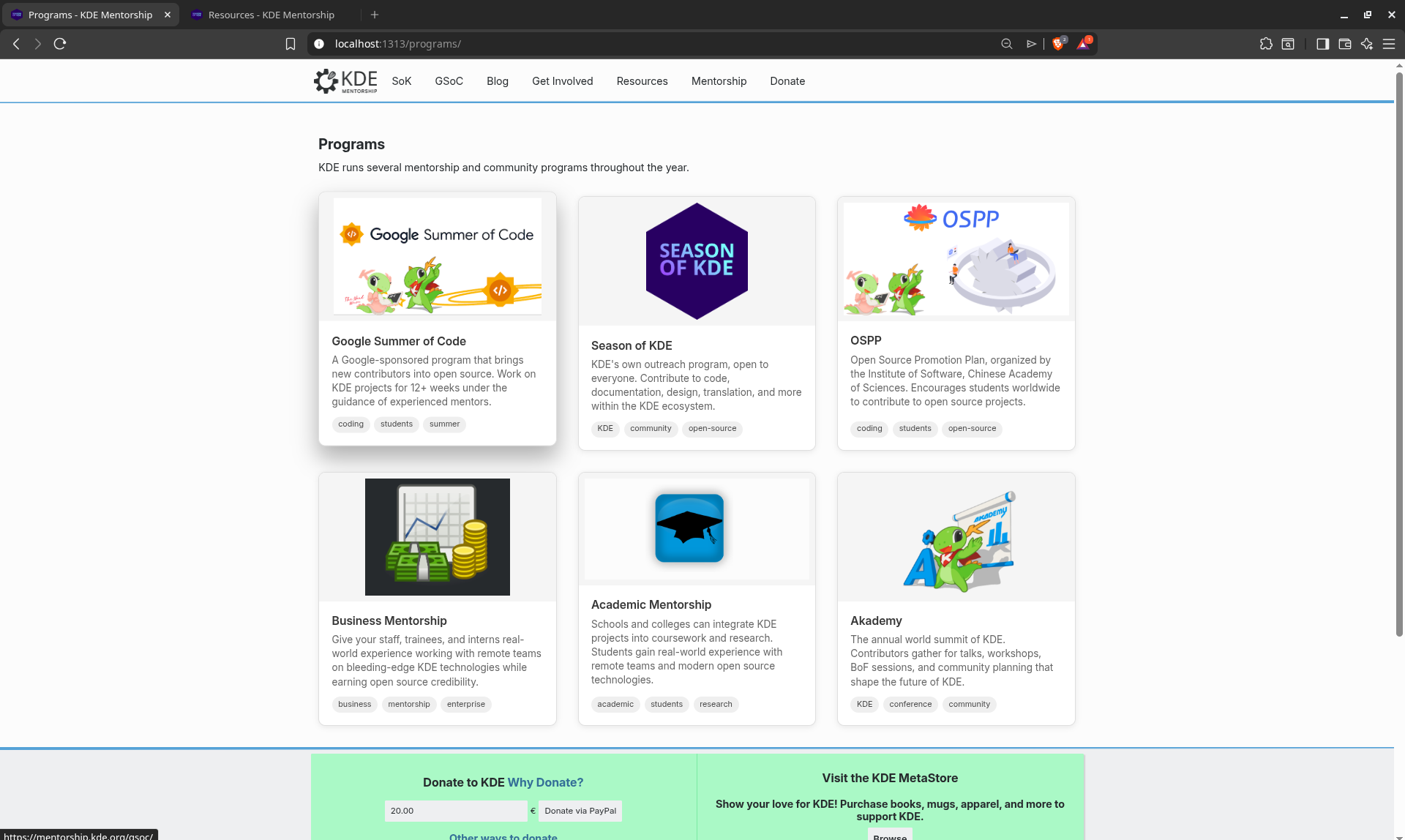
Aryan's project was to make mentorship.kde.org better so that new contributors who want to work with the KDE ecosystem have a better onboarding experience. As part of this effort, a new "/programs" page was added. It gives a structured overview of the main KDE mentorship programs and links to help newcomers find their way around the opportunities more easily. He also changed the card template to better organize the repository, making it more structured, easier to maintain. Aryan also filled the /resources page with more useful resources for new contributors.
Documentation website
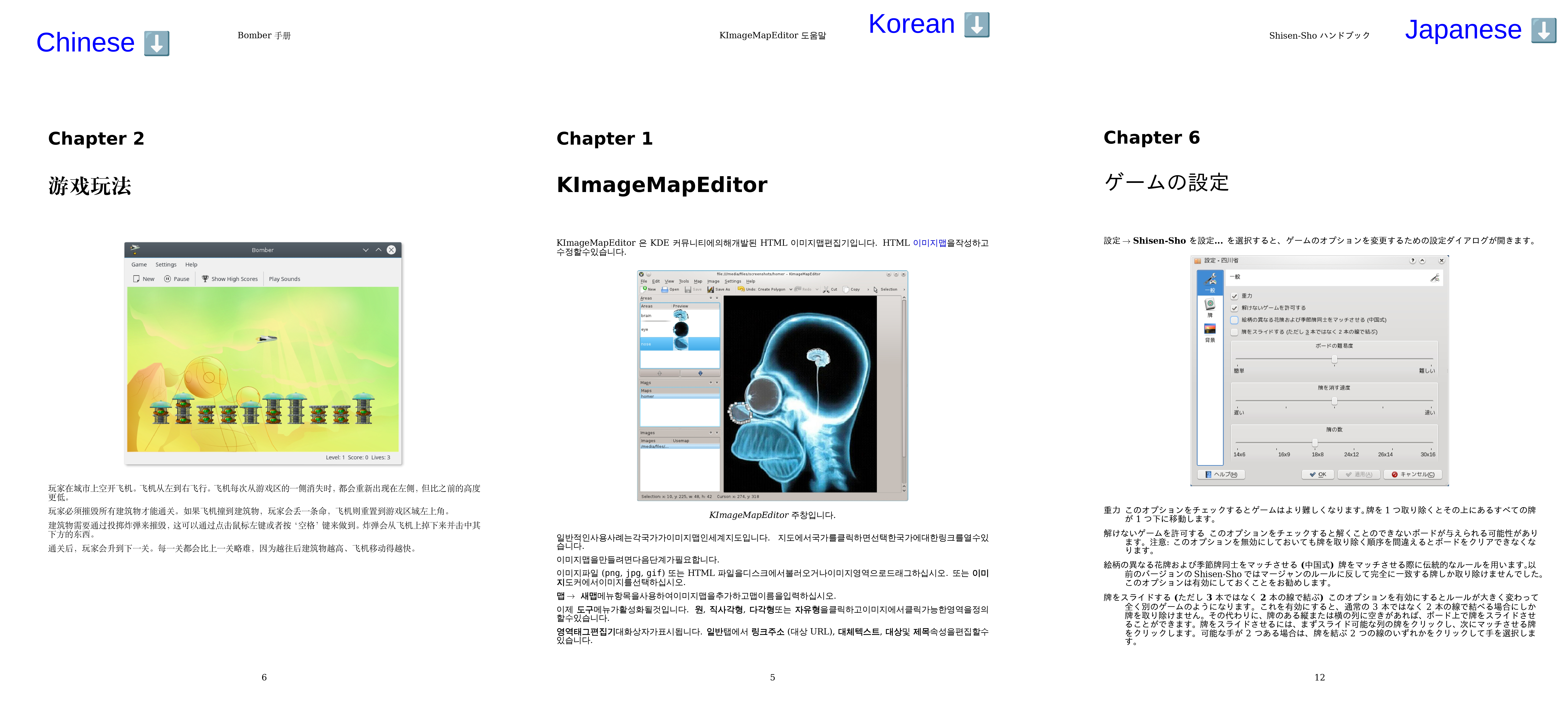
Mohit Mishra worked on decoupling the bundled dblatex fork from the docs-kde-org repository and fixing PDF generation for Chinese, Japanese and Korean (CJK) languages for KDE documentation. This involved switching the TeX engine to XeTeX from pdfTeX and then re-integrating the KDE styles. The outputs are now nearly identical, with CJK languages rendering correctly as well. There is still work in process to ensure there are no regressions and we can officially switch to this generation.
Scripty
Aviral Singh and Keshav Nanda worked on fixing KDE's translation tools so translators can easily locate where text belongs in the code. Keshav corrected the underlying logic to make sure these paths are always accurate, and Aviral built an automated testing system to validate the fix across KDE projects.
Marknote
Siddharth Chopra worked on Marknote to add source mode for notes. The Source Mode essentially allows users to bypass the rich-text WYSIWYG interface and directly edit the raw markdown. While working on this feature, Siddharth also made a major refactoring of the codebase (on both the QML and C++ sides). Spell checking using Sonnet was also added, among other small fixes and improvements.
KDE Eco
Hrishikesh Gohain worked on setting up KEcoLab's measurement environment with Wayland on Fedora 43 KDE Plasma Desktop. He ported the Okular measurement scripts from the X11-based xdotool to ydotool and kdotool, which work on both X11 and Wayland. His contributions can be found in this merge request. The original project plan had included measuring the KDE Plasma desktop environment itself. However, porting the Okular scripts to Wayland in the new lab setup turned out to be more complex than expected. Moreover, measuring a desktop environment may need some infrastructure changes to the KEcoLab setup. Hrishikesh is currently working towards it and will continue after SoK26 is over.

Automate Promo Data Collection
Chuyen Nguyen wrote automation scripts and created environments for them to perform some of the KDE promotional team's insight data collection tasks. The first script collects KDE's X, Bluesky, Mastodon, and Threads accounts' follower and post counts using a mix of API requests and web scraping methods alongside a local Nitter instance. The second script scrapes the KDE subreddit's Reddit Insights page for weekly metrics on page visits, unique visitors and its total member count and includes a Docker image that allows for headless execution. The final script collects articles related to KDE using Google Alerts emails and performs sentiment analysis on them using a locally run large-language model. The figure below shows output from the follower and post count scraper, Reddit Insights page scraper, and Google Alerts evaluator respectively.

Plasma Setup
Onat Ribar worked on bringing Plasma Setup, KDE's first-run setup wizard, to Plasma Mobile. Plasma Setup was built with desktop screens in mind, and running it on a phone showed overall accessibility issues including but not limited to overlapping components, content clipping on short window sizes, session buttons that remained tappable beneath wizard pages, and a timezone selector built around an interactive map that was nearly unusable on a small touchscreen. Onat worked through these systematically across the wizard's QML UI, resulting in an adaptive experience across screen sizes and input methods without affecting the desktop UX. Two MRs have been reviewed, merged, and are now part of the upstream codebase in repositories plasma-setup and plasma-workspace.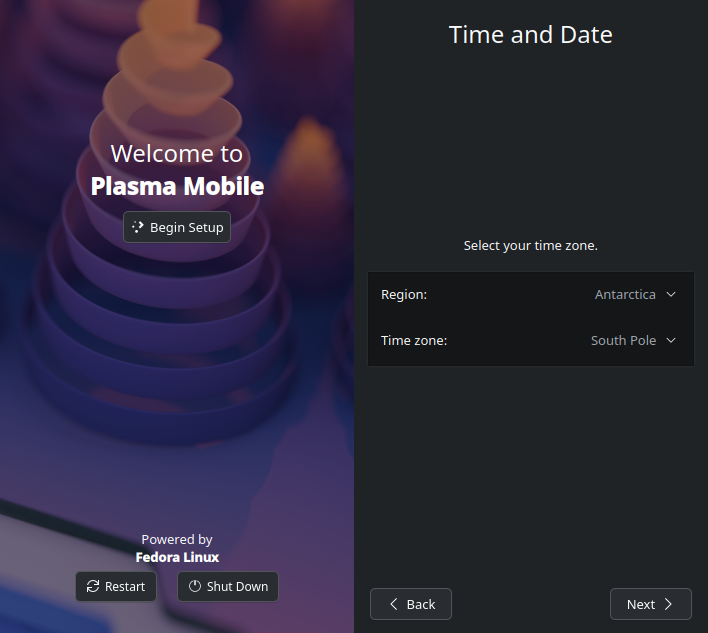
Falkon
Sairam developed a XMPP extension that adds a chat client directly into the KDE Falkon browser's sidebar. Written in Python using Slixmpp, the project lets users message each other and run interactive WebXDC apps right inside their chat window. It supports modern XMPP features like Message Carbons (XEP-0280) for device syncing, Message Corrections (XEP-0308) for edits, Emoji Reactions (XEP-0444), and HTTP File Uploads (XEP-0363). This setup turns Falkon into a communication tool without even leaving the browser.
J Shiva Shankar added XMPP bookmark syncing to the Falkon browser. The basic setup is working, so whenever you add or update a bookmark, it successfully syncs across your devices. Deleting bookmarks still has a few bugs right now, but they have been documented. He plans to keep contributing after SoK to squash these bugs and get the feature completely polished.
Mankala Engine
Sayandeep Dutta helped in redesigning the MankalaNextGen GUI with Kirigami and added designs fixing the Main UI and the Game with game boards and shells. He also added music with Qt to Mankala and made translations in Tamil and Hindi. Made assets for the game variants using Krita in their traditional designs and motifs. Started with the review process of MankalaNextGen with the CI build.
Pavan Kumar enhanced MankalaEngine by adding an opening book and investigated performance of multithreaded alpha-beta search using OpenMP, Pthreads and Taskflow. In addition, he enhanced MankalaNextGen by creating visual assets for game boards and seeds and also created logos for MankalaEngine and MankalaNextGen.
Article contributed by Johnny Jazeix under the CC-BY-SA-4.0 license.